Gaia vs Midjourney for Architecture: What Actually Matters
Midjourney is extraordinary. It is also not built for architecture practice. Here is where the two diverge.
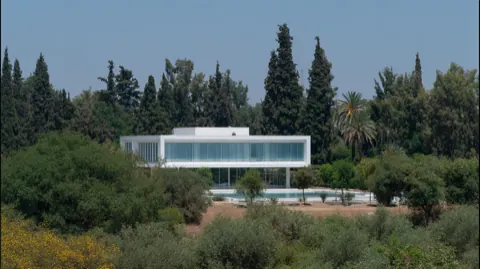
Midjourney is one of the best image generators ever built. It produces imagery that regularly stops people mid-scroll. Architects have adopted it enthusiastically for mood boards, early ideation, competition entries, even client presentations.
But there is a difference between an image generator that can make architectural pictures and a studio built for architecture practice. The gap shows up the moment you try to actually use Midjourney in a project workflow.
The input problem
Midjourney takes text prompts. Nothing else. You describe what you want in words, and the model interprets. This is powerful for exploration - you can conjure spaces that don't exist yet. But architects don't start from words. They start from drawings.
Gaia takes SketchUp screenshots, Rhino viewport exports, Revit massing models, hand sketches on trace, even rough concept collages. The render is derived from your geometry, not the model's imagination. Your building, your proportions, your spatial logic - rendered, not reimagined.
Camera control
In Midjourney, camera angle is a suggestion. You can write 'eye-level view from the southeast corner' and you might get something close. Or you might get a dramatic aerial. Or a fish-eye. The model decides.
In architecture, the camera is a design instrument. Eye-level entry sequence. Aerial massing view. Interior key perspective from the living room toward the garden. These are not aesthetic preferences - they are communication devices. Gaia locks to your viewport. The camera is yours.
Style consistency across a project
Architecture projects need visual consistency. A competition board with six images should look like they came from the same project, the same designer, the same rendering approach. Midjourney generates each image independently - different lighting, different atmosphere, different materiality, even when you use the same prompt.
Gaia maintains style consistency through render presets and taste profiles. Your Brutalist concrete reads the same in the exterior as it does in the section. The oak cladding in the detail view matches the facade. Consistency is not a bonus - it is a baseline requirement for professional presentation.
Material accuracy
Ask Midjourney for Corten steel and you'll get something beautiful that reads as rusty metal. Ask it for a specific timber species at a specific scale and you'll get an interpretation. For mood boards, that's fine. For a client meeting where you're specifying materials, it's a problem.
Gaia's material library is calibrated against real architectural materials: their texture, scale, weathering, and light behaviour. When you select brushed brass, it looks like brushed brass, not gold, not bronze, not a fantasy metal.
Iteration vs variation
This is the fundamental difference. Midjourney gives you variations - four different interpretations of a prompt. Each one is a new image. Gaia gives you iterations - refinements of the same design. Change the material, keep the geometry. Adjust the lighting, keep the composition. Swap the landscape, keep the building.
Architecture is iterative. You don't want four random buildings. You want your building, four ways.
Practical comparison
- Input: Midjourney = text prompts only. Gaia = sketches, screenshots, 3D viewports, photos.
- Camera: Midjourney = suggestive. Gaia = locked to your viewport.
- Consistency: Midjourney = per-image. Gaia = per-project style profiles.
- Materials: Midjourney = interpretive. Gaia = calibrated architectural library.
- Iteration: Midjourney = new image each time. Gaia = refine the same design.
- Pricing: Midjourney = $10-60/mo general use. Gaia = free tier + EUR 24/mo Pro for architecture.
- Output: Both produce high-resolution images suitable for presentations.
- Commercial use: Both allow commercial use on paid plans.
When to use which
Use Midjourney when you're exploring. When you want to see what a 'floating pavilion made of woven bamboo' might look like before you've drawn a single line. It's unmatched for pure imagination.
Use Gaia when you are designing. When you have geometry and need to communicate it. When the client needs to see their project, not a beautiful picture that happens to be a building. When you need ten renders of the same design in ten minutes, not ten different buildings.
They are not competitors. They serve different phases. But if you are choosing one for daily practice, you need the one that speaks your workflow.
Try Gaia free at gaia.computer/studio